Note: Currently Badge only offers Microsoft and Google SSO, which must be set up by your organization.

If your organization is interested in setting Microsoft SSO, please see: Enabling Microsoft Single Sign-On (SSO)

If your organization is interested in setting Google SSO, please see: Enabling Google Single Sign-On (SSO)
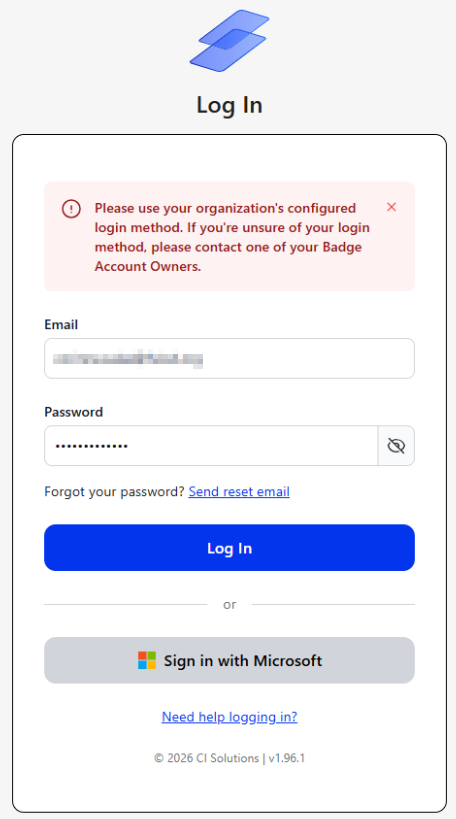
An Error message appears when your organization has enabled Single Sign-On (SSO) and you attempt to log into Badge using an email address and Badge password.
After SSO is enabled, users must sign in using the identity provider configured by their organization.
Example Error Message
How to Log In
- Return to the Badge login screen.
- Select the login option configured by your organization:
- Sign in with Microsoft, or
- Sign in with Google
- Sign in using your organization-managed Microsoft or Google Workspace account.
Do not enter your email address and Badge password in the standard login fields.
Password-based Badge login is disabled for organizations using SSO.
Still Unable to Login?
Ask a Badge Owner to confirm that:
- An account already exists for you in Badge.
- The email address in Badge exactly matches the email address associated with your Microsoft or Google Workspace account.
- You have been granted access to Badge through your organization’s identity provider.
- You are selecting the correct Microsoft or Google account when signing in.
If these items have been confirmed and you still cannot log in, submit a Support ticket and include:
- Your email address
- The login option you selected
- The error message displayed
- A screenshot of the error, when possible
Related Articles
- How to Enable Microsoft Single Sign-On (SSO) with Badge
- Readiness Checklist: Microsoft Single Sign-On (SSO) Before You Begin
- How to Enable Google Single Sign-On (SSO) with Badge
- Readiness Checklist: Google Single Sign-On (SSO) Before You Begin
Was this article helpful?
That’s Great!
Thank you for your feedback
Sorry! We couldn't be helpful
Thank you for your feedback
Feedback sent
We appreciate your effort and will try to fix the article