Locate and Secure the RFID board
Follow these steps only if you feel comfortable working with hardware.Locate the RFID Board
1. Push the top cover button where the ribbon sits and remove the ribbon

2. Locate the light gray tab on the right inside of the printer, and pull up. The printer's side panel will begin to open.

If the door does not open, keep pulling up on the tab and use a pen or spare card to pry the panel open3. Once the right side panel is open, look for a green board positioned at the bottom right

Secure the RFID Board
1. Make sure the RFID board is fully inserted by pushing in the bottom part of the board.
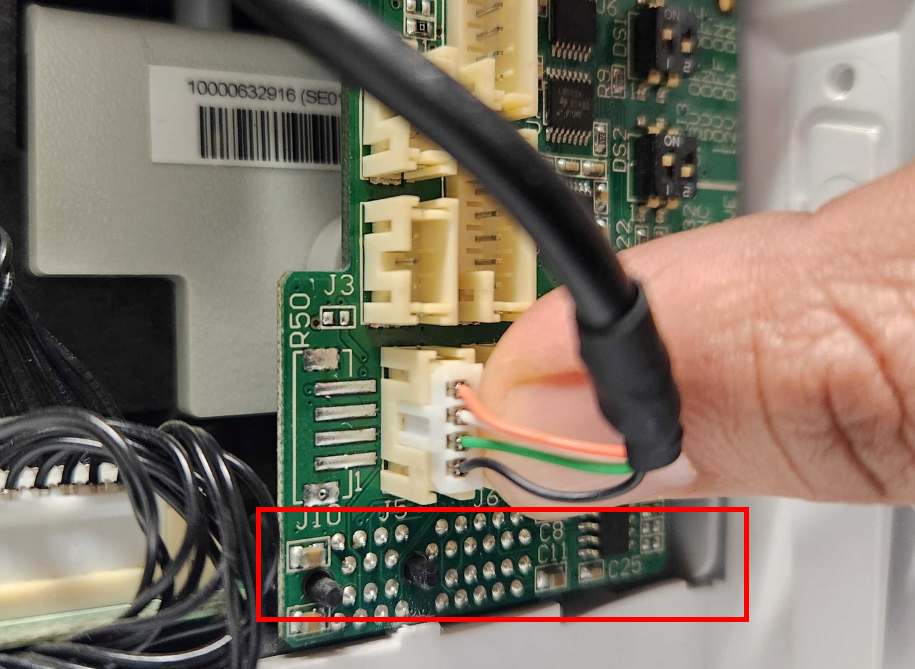
If it is not, gently push the bottom of the board to nudge it in further.2. Ensure all wires are fully connected to the board

The RFID board coming loose is a common issue.Was this article helpful?
That’s Great!
Thank you for your feedback
Sorry! We couldn't be helpful
Thank you for your feedback
Feedback sent
We appreciate your effort and will try to fix the article